Facilities
The Facilities window allows you to update your interest in working or not working at the test center. If you are not willing to work at any of the test centers, you can select that test center and update the reason for not being interested. You will not receive Event Offer notifications for the selected test centers where you are unwilling to work.
Note: It is not mandatory to update your interested test centers in Facilities. If you are willing to work, you can update the test centers.
Adding Facilities
To add or update the Facilities, follow the steps below:
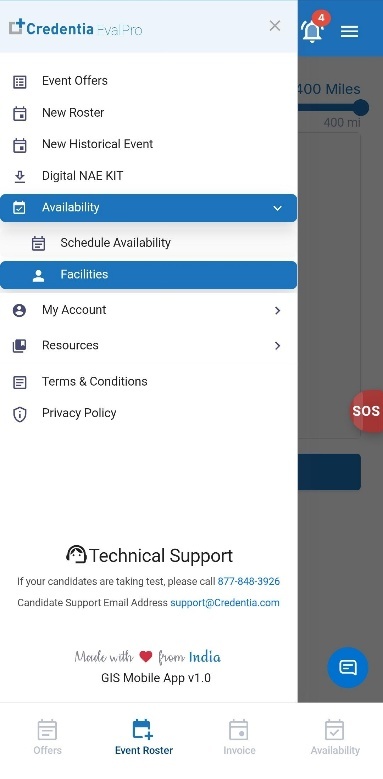
- Tap the side menu icon in the top right corner of the screen, tap the Availability option, and select Facilities from the dropdown menu.
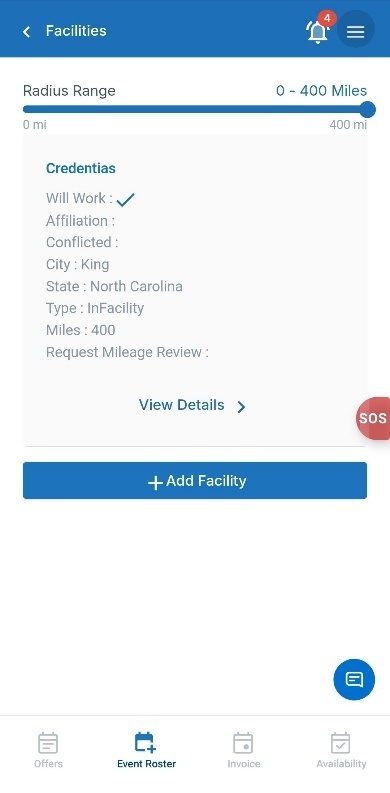
- In the Facilities section, the list of available test centers is within your selected radius.
- Use the Radius Range slider to adjust the distance and filter test centers based on their distance from your primary location.
- Tap Add Facility to add a new test center preference.
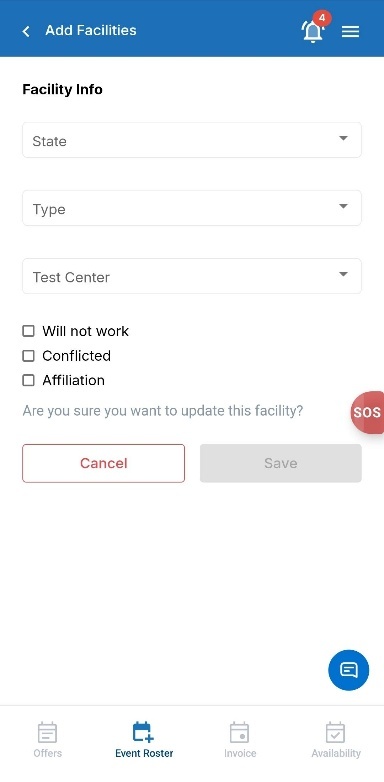
- On the Add Facilities screen, select the required facility information:
- Select the State from the dropdown list.
- Select the Test Center from the dropdown list.
- Choose the appropriate facility preference:
- Will not work: Select this option if you do not want to work at the selected test center and do not wish to provide a reason.
- Conflicted: Select this option if you have a conflict with the selected test center. You will be prompted to enter a reason.
- Affiliation: Select this option if you have an affiliation with the test center. You must specify whether the affiliation is current or previous and provide a reason.
- If none of these options are selected, it indicates that you are willing to work at the selected test center.
- Review the facility details to ensure the information entered is correct.
- Tap Save to add the facility preference. Tap Cancel to exit the page without saving changes.